 Hello Job Tracker
The bookmarklet
Some job sites will not let any server read their pages, and copying an ad by hand is tedious. The bookmarklet is a button you keep in your browser's bookmarks bar: on any job ad, one click reads the page in your own browser and opens Hello Job Tracker with the job ready to check and add.
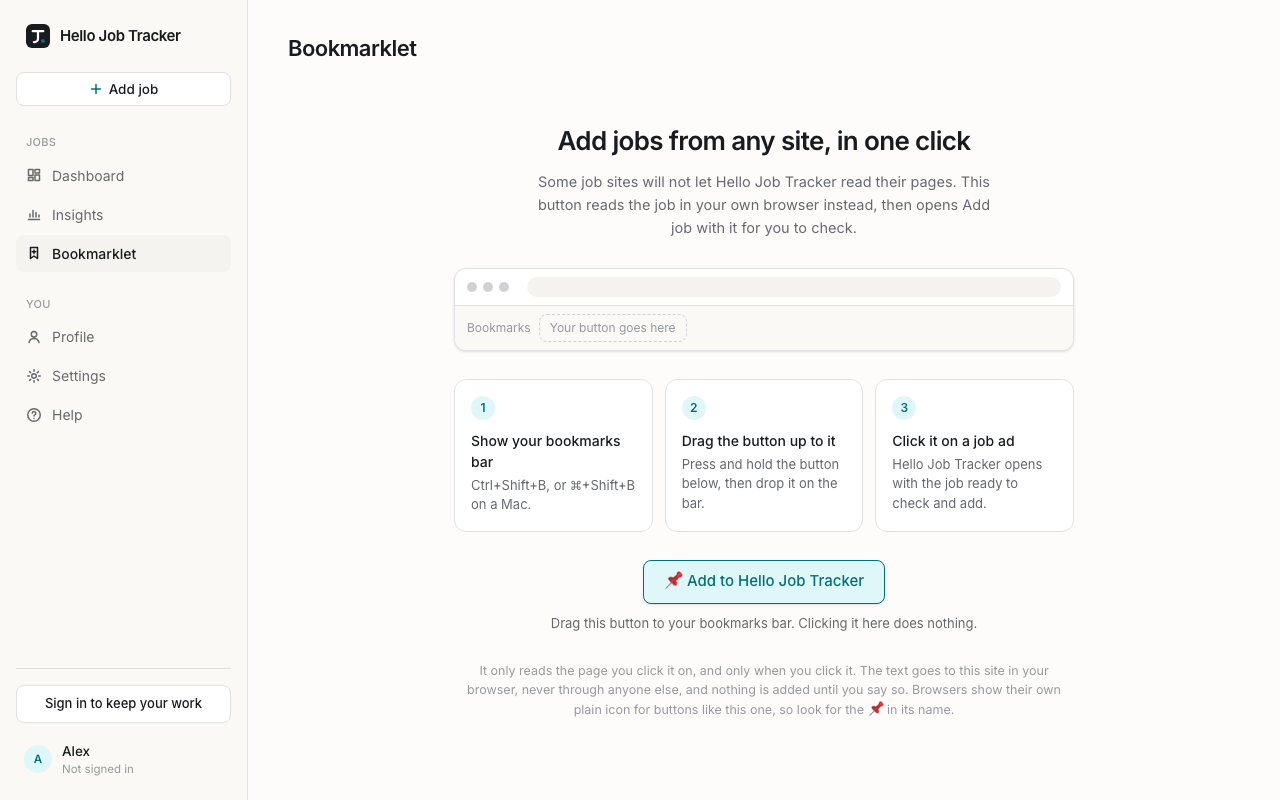
Setting it up (once, on a computer)
- Choose Bookmarklet in the sidebar (it is also linked at the bottom of + Add job).
- Show your browser's bookmarks bar: Ctrl+Shift+B, or ⌘+Shift+B on a Mac.
- Drag 📌 Add to Hello Job Tracker up onto the bar and let go. The page shows where it will land while you drag. Clicking the button on the Bookmarklet page itself does nothing; it only works from the bar.
Browsers draw a plain icon for a bookmarklet (it is a small piece of code, not a web address, so there is no site icon to show), which is why its name starts with 📌. Phones have no bookmarks bar, so set it up in a browser on a computer.
Using it
- Open a job ad on any site: Seek, LinkedIn, Indeed, a company's careers page.
- Click 📌 Add to Hello Job Tracker in your bookmarks bar.
- Hello Job Tracker opens in a new tab with + Add job already filled in: the ad's link and its text. Choose Read the text.
- Check what was read, then choose Add, as for any job (see Adding jobs).
If the job site asks you to sign in to see the full ad, sign in there first, then click the bookmarklet: it reads what your browser shows.
What it reads, and where it goes
- It reads only the page you click it on, and only when you click it. It changes nothing on the job site.
- The page's text travels to Hello Job Tracker in the part of the address after "#", which browsers never send to any server. The app removes it from the address bar as soon as the page opens.
- Nothing is saved until you choose Add. Once you do, the job is kept and read like any other: what a feature needs goes to OpenAI, as the Privacy page explains.
- It carries at most 30,000 characters, which is more than any job ad.
If it does not work
- Nothing happens when you click it: your browser may have blocked the new tab. Look for a blocked pop-up icon at the end of the address bar, allow pop-ups for that site, and click again.
- The text is mostly menus and footers: that is what the page showed. Read the text picks out the job; check the review before adding.
- You moved to a new computer or browser: drag the button to that browser's bar too.